Web – Guitar Gears Gallery [Update]

I’ve decided to redesign the general look of the guitar website as I felt the previous design lacked some edge and colour and I was possibly too reserved with the use of stronger tone.
There were hardly any changes made in the HTML side of the site other than a few text alteration. The main changes were made in CSS and in Photoshop with general colour changes and images incorporated and rearranged.
I’ve removed the custom font for the menu system as it caused a few alignment issues with older browsers that doesn’t support custom fonts. It also didn’t fit with the overall style and is now replaced with a standard sans-serif font.
I used a purple / orange colour theme as it compliments well with each other and looks nice with the dark grey background.
The new design now has a better contrast and vibrant dynamic tones, hopefully giving it more energy to the overall look.
[UPDATE – 21/03/12] Added a description section for each page and some small alignment changes.
[UPDATE – 02/08/12] Added some background images and altered the colour theme.
Web – Guitar Gears Gallery

Here’s a fun website I’ve created, dedicated to my guitars, effects pedals and amps. It was created using HTML and CSS in Dreamweaver and took roughly a week to complete.
I started with some quick design ideas in Photoshop for the general look and then once I was satisfied with the layout; I progressed through to Dreamweaver for the coding design.
The photos were taken using a Canon 20D dSLR and then underwent some enhancements in Photoshop with level adjustments and colour correction. I used the High Pass filter to sharpen the images up.
Lightbox script plug-in was used for the gallery section as it’s a simple and nice way of viewing the photos.
I tried implementing some cool CCS3 functions that I learnt along the way and played around with transition effects which really adds dynamic to the site.
The drop down menu was done using HTML unordered lists and CSS to hide the menu, I used ‘absolute’ position to make the list appear on top of the menu, turning it into a “drop up” menu system.
The homepage was the last page to be created and took me awhile to figure the best method for linking the images.
The illustration images are in PNG format with transparency, I tried seeing if I could use the hover link state in CSS to create a mouseover, I found out this didn’t work since the cursor still interacted with the transparent background.
To create the end result I used the Image Map in HTML to draw the link poly shapes and added a javascript for the onmouseover action.
I added a preload javascript for the mouseover images to give a better result with no delay when users first hover over the illustration links in the homepage.
I tested the site through various browsers and there were a few small compatibility issues mainly with fonts which has mostly been fixed, there’s still an issue with Firefox support on cursive font which causes not to the display the primary custom heading font, I found this quite odd since all the other browsers support these fonts.
I also had checked the site in older IE browsers and there was a problem in IE7 not displaying the content, this is now fixed with a CSS code specifically for IE7 only with a small alteration in the positioning of the container element.
Overall, I really enjoyed making the site and was a lot of fun!
Panorama – China
Seven Star Crags, Zhaoqing, China
Here is a panorama of a popular lake area in Zhaoqing, a city situated in southern China.
Pano2VR was used to create the flash from the panoramic photo.
Panorama – Hong Kong
Here is a panorama of Tai Po, an area of Hong Kong where I recently visited.
I had not been back for over a decade and a lot has changed with many of the areas being revamped and modernized; but Tai Po still holds a very traditional look with its old buildings that I still remember when I first came to visit.
Web – New Star Restaurant
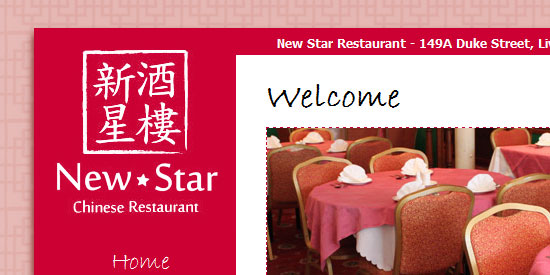
Here is a website that I made a while ago for a Chinese restaurant situated in Liverpool.
It’s one of the first websites I’ve created using HTML and CSS and it was a good learning experience.
I started off by coming up with design ideas in Photoshop; then moved onto Dreamweaver for the actual site creation.
The method I use for making websites is to do everything in Code based, this allows me better control of the design layout and personally find it easier to make adjustments.
Some of the newer features of CSS has been added to enhance the design of the site such as drop shadows and custom fonts. The viewing of the site has been carefully optimized to fit all resolution size above or at 1024×768 view.
I’ve tried to keep the site simple and user-friendly with a traditional yet modern approach in design.